AI Overviews jumped onto most branded searches this autumn. Here's how we're handling it for developer tools, and what we'd do if it were our name on the line.
For years we told every developer tool founder the same thing: you might lose the fight for "what is a vector database", but you will always own the search for your own name. We stopped saying that in October.
Sometime in late September, Google started putting AI Overviews on top of branded searches. Not a few. Most of them. Someone types your product name, and before they see your homepage, your docs or your pricing page, they get a paragraph Google wrote about you.
That paragraph might be accurate. It might quote a two-year-old Reddit thread. It might mention your competitor. Either way, you didn't write it. This article is what we've learned since, pulled from Google's own updates, the best data published after September 2026, and the way we now run branded search for developer tools.
Key takeaways
- AI Overviews now appear on roughly 8 in 10 branded searches in the US, up sharply since July.
- Your brand name is no longer a guaranteed click. It's a summary you have to earn.
- Being cited in AI answers seems to help clicks elsewhere on the page, so opting out isn't a free win.
- The fix isn't a trick. It's clear facts on your own site, honest third-party mentions and content a real engineer would sign.
What Google changed after September
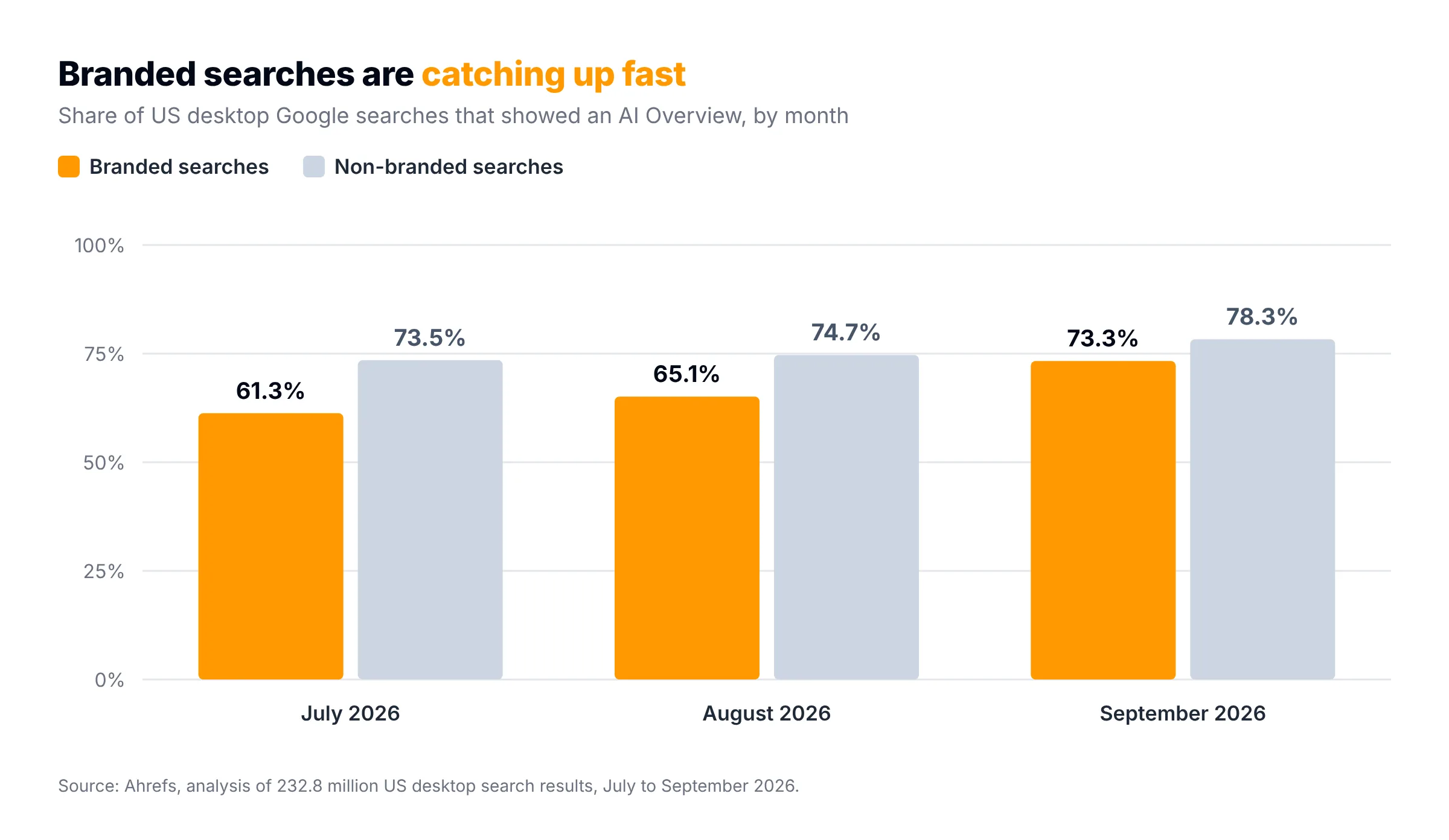
The change that caught our attention first wasn't announced at all. It showed up in tracking data. DemandSphere, which checks branded keywords every day, saw AI Overviews on 26.12% of its tracked branded searches on September 1. By September 27 that hit 90.48%, before settling at 82.06% on September 29 (Search Engine Land, Scalevise). Ahrefs then looked at 232.8 million US desktop results from July to September and found AI Overviews on 83% of branded queries by the end of September (Ahrefs).
The wider picture moved too. By late October, data from Semrush, SE Ranking and seoClarity put AI Overviews on more than 80% of Google searches. A year earlier the figure was around 50% (Search Engine Roundtable).
Google also tightened the rules on how we make content. On October 1, it rewrote part of its guidance on AI-generated content to say machine-written text can contain made-up facts and that a human check before publishing is critical (PPC Land). A few weeks earlier, Google's John Mueller warned that low-value programmatic SEO can make Google's systems lose faith in a whole site, and that winning it back takes time and significant effort (Search Engine Roundtable).
Put those four things side by side and the message is hard to miss. Google wants to answer more searches itself, including the ones about you, and it's getting stricter about the pages it draws those answers from. The chart below shows how quickly the branded share caught up with everything else.
 ## What we noticed when we started searching our own clients' names
The first thing we did was the obvious one. We opened an incognito window and searched the brand names we work with, plus the phrases developers actually type around them.
It's an uncomfortable exercise, and we'd recommend it to every dev tool team this week. The AI Overview usually sits right at the top. Ahrefs found that 76.2% of branded AI Overviews appear in position one (Ahrefs). So the first thing a developer reads about your product is now a summary, not your headline.
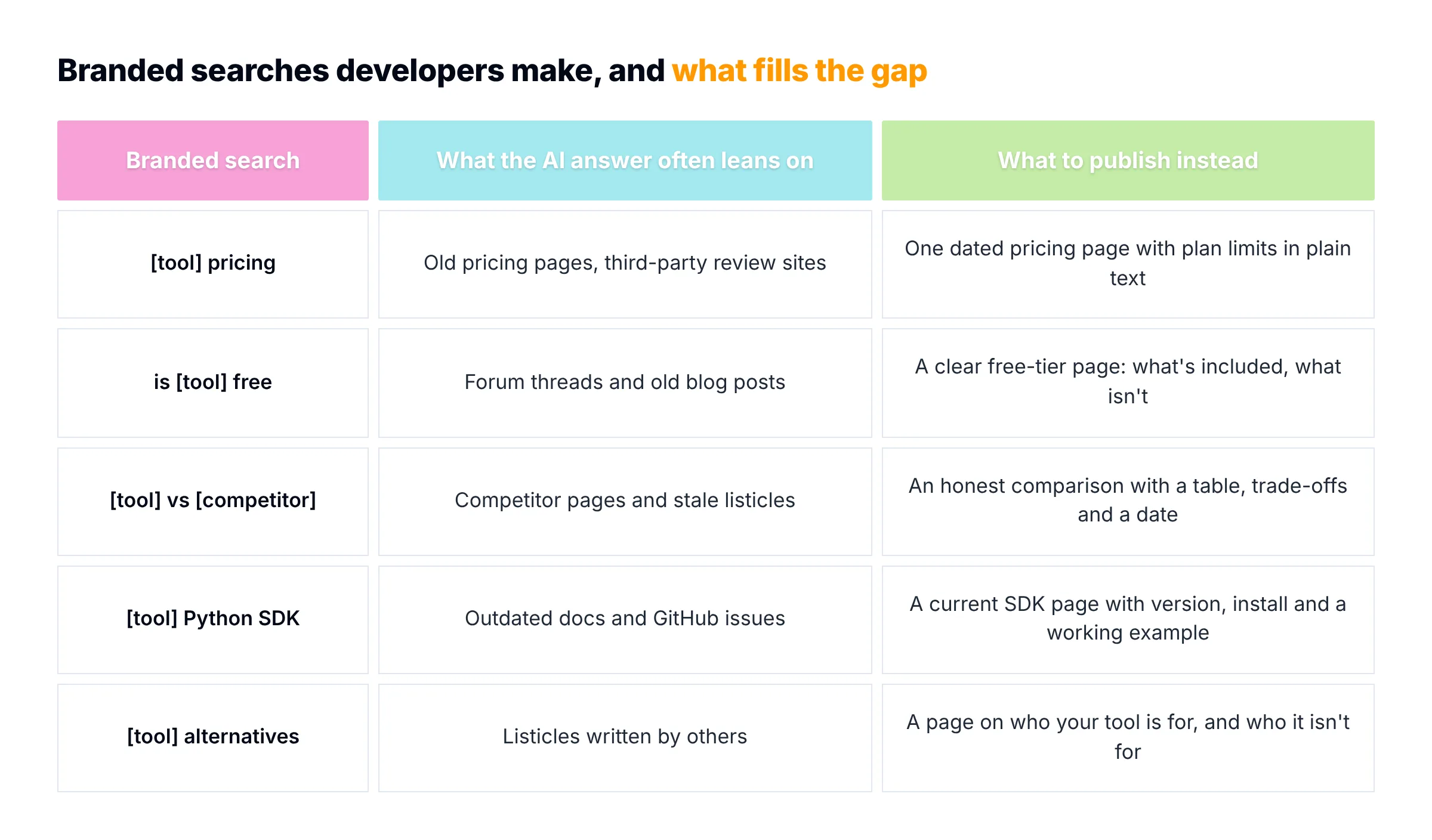
The bare brand name was rarely the problem. The trouble sat in the longer branded searches, the ones developers make when they're close to a decision: "is [tool] free", "[tool] pricing", "[tool] vs [competitor]", "[tool] Python SDK", "[tool] alternatives". Those answers lean on whatever Google can find, and for a lot of dev tools that means old forum threads, outdated comparison posts and pricing pages that changed two plans ago.
The pattern we keep coming back to is simple. When a fact about your product isn't stated clearly on your own site, Google fills the gap with someone else's version of it. Here's how that tends to play out across the branded searches developers make.
 ## What we changed in our developer marketing playbook
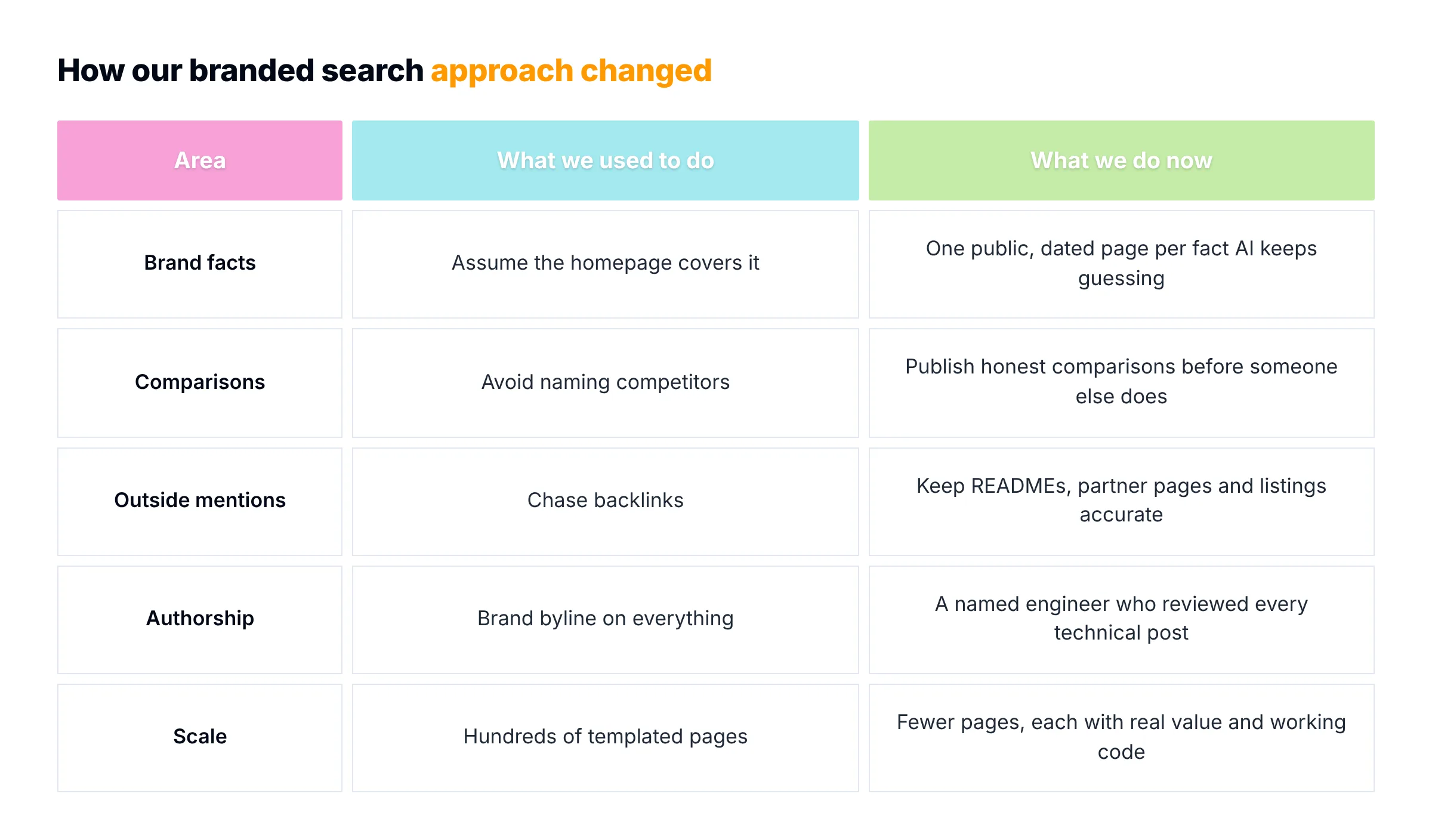
We didn't throw anything out. We moved a few things from "nice to have" to "do this first".
1. We write down the facts Google keeps guessing. Every dev tool we work with now gets a short set of plain, public pages for the questions AI answers about them: pricing and free tier, usage limits, supported languages and SDKs, security and compliance. Dated, specific, one topic per page. If Google is going to summarise you, give it something accurate to summarise.
2. We write the comparison before someone else does. "[Tool] vs [competitor]" is one of the branded searches where AI Overviews do the most damage, because the only sources are often a competitor's page or a stale listicle. An honest comparison on your own site, with a table, real trade-offs and a date, gives Google a better source and gives developers a page they actually trust.
3. We treat third-party mentions as part of SEO. AI answers pull from across the web, not just from you. That means GitHub READMEs, community answers, integration partner pages, conference talks and review sites now shape what Google says about your brand. We plan for them the way we used to plan for backlinks.
4. Every piece has a real engineer behind it. Google's October guidance says AI-written text needs a human check, and its updated helpful content docs warn against faking authorship (Search Engine Roundtable). We already work this way, which we wrote about in our approach to human-led technical content. Now there's an SEO reason on top of the trust reason.
5. We stopped recommending page farms. Generating hundreds of near-identical integration or "what is" pages used to be a growth hack. After Mueller's warning about losing faith in a whole site, we'd rather publish ten integration pages with working code than five hundred with a swapped product name. The table below sums up how our approach shifted.
 ## Should you opt out? Why we say no, and how we measure instead
The first question most founders ask us is whether they can just switch AI Overviews off for their site. Google does offer controls, and some UK sites have been able to opt out of AI features through Search Console since June.
The best evidence we've seen says opting out costs more than it saves. In late October, SEO consultant Cyrus Shepard shared a small experiment where he briefly opted one site out of AI Overviews and AI Mode. He estimated those AI impressions earned about a 0.9% click-through rate, against roughly 0.4% for the site's search results overall. AI features made up about 10% of the site's impressions but an estimated 21% of its search clicks (Search Engine Journal).
He also saw the site's regular organic results get clicked more when it appeared in the AI answer, which he called a halo effect (Search Engine Roundtable). It's one site and a short window, so we treat it as a strong hint, not proof. But it matches what we'd expect: the more places your brand shows up on the page, the more likely someone clicks one of them.
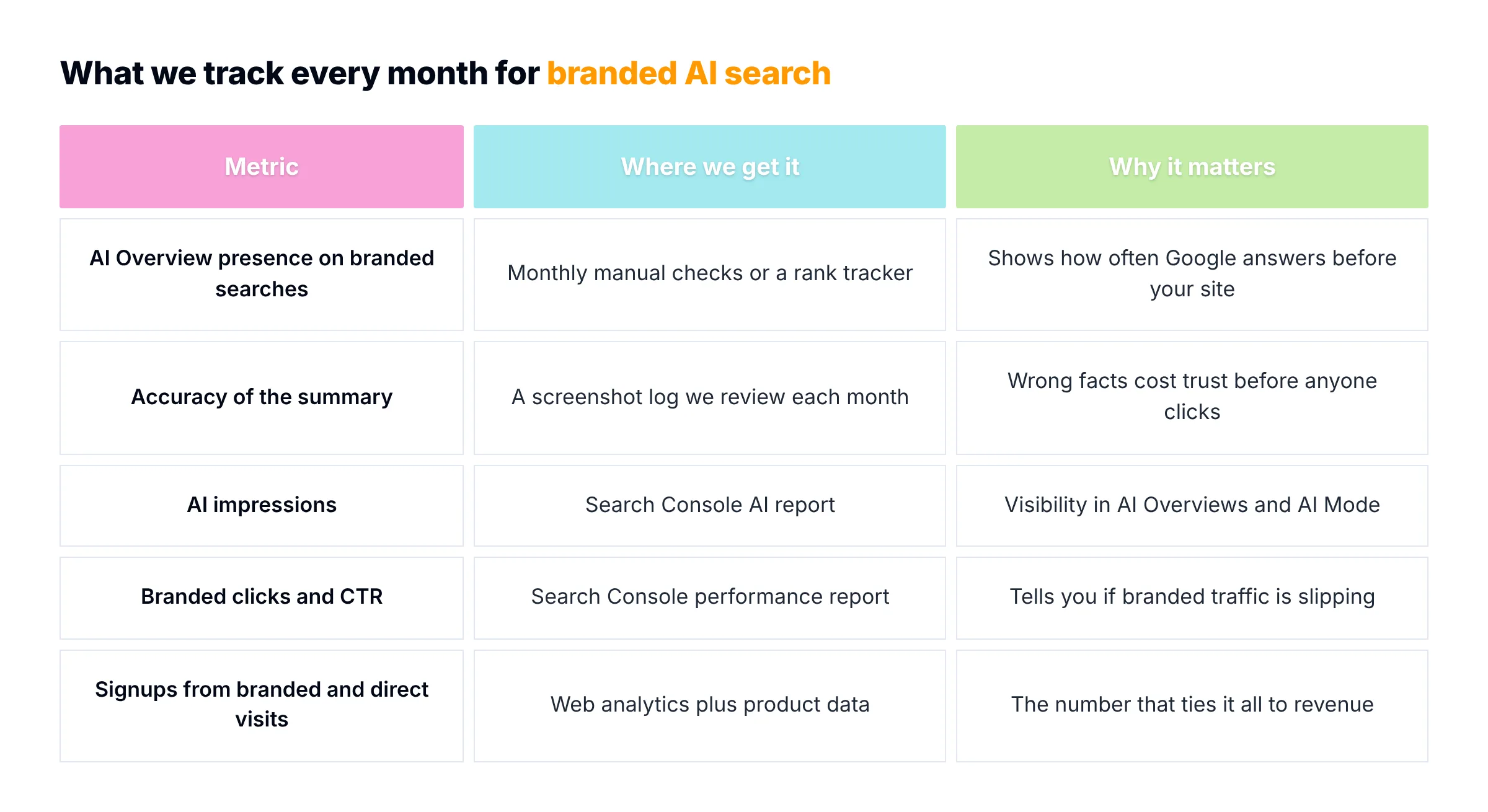
Measuring all this is still awkward. Google's Search Console AI report shows impressions but not clicks, and Google's Gary Illyes has suggested click data may not be coming (Search Engine Roundtable). We covered the workarounds in how to measure AI Overviews and AI Mode traffic. For branded search specifically, we now track a small set of numbers every month.
 ## What we'd tell a dev tool team starting today
If your brand searches haven't had a proper look since summer, start here. None of it needs a big budget, and most of it fits in two weeks.
- Search yourself like a developer would. In a logged-out browser, try your brand name plus "pricing", "free", "vs", "alternatives", "SDK", "docs" and "down". Screenshot every AI Overview.
- Mark what's wrong, old or missing. Note which sources the AI cited for each claim.
- Fix the facts at the source. Publish or update one clear page per fact: pricing, free tier, limits, languages, security.
- Publish your own honest comparisons for your two or three most-searched competitors.
- Clean up the outside sources you can reach: your GitHub README, partner listings, marketplace pages and old docs still in the index.
- Audit any programmatic page sets and merge or remove the thin ones.
- Put a named, real reviewer on every technical post.
- Repeat the search check every month and keep the screenshots, so you can see what changed.
If you only do one thing, do the first one. Most teams we talk to have never actually read what Google says about them.
FAQ
Do AI Overviews now show up for brand name searches?Yes, most of the time. DemandSphere tracked branded AI Overviews rising from about 26% to over 80% of its branded keywords during September 2026, and Ahrefs measured 83% of US desktop branded searches by the end of that month.
Will branded AI Overviews reduce clicks to my site?Nobody has clean data on branded click-through yet. Early evidence on AI features in general suggests being cited can help clicks on the rest of the page, but expect fewer people to click just to confirm a basic fact.
Can I stop Google from showing an AI Overview for my brand?You can't choose whether Google shows one. You can influence what it says by publishing clear, current facts on your own site and keeping trusted third-party sources accurate.
Should I opt my site out of AI Overviews and AI Mode?We don't recommend it for most developer tools. A small October 2026 experiment found AI features sent a site a meaningful share of its clicks, and opting out also lowered clicks on its regular results.
Is programmatic SEO still safe for developer tools?Only when every page adds real value, like an integration page with working code. Google has warned that low-value programmatic pages can make its systems lose faith in a whole site.
The bottom line
Your brand name used to be the one search you could take for granted. Not anymore. Google now writes a summary of you before most people see your site, and that summary is only as good as the sources it can find.
The good news is that the fix rewards the same things developers have always rewarded: clear facts, honest comparisons and content written by people who know the product. Do those well and the AI Overview becomes another place your brand shows up correctly, not a place it gets misquoted.
Want to know what Google says about your developer tool right now? We'll run the branded search audit with you and show you what to fix first. Book a discovery call or see how we build content strategy for developer tools.
Sources