Your pages are showing up in Google's AI answers. Google will now tell you how often. It still won't tell you how many people clicked.
That gap turned into a public argument on LinkedIn last week. On November 2, an SEO posted that click and query data was coming to Search Console's AI report. Google's Gary Illyes stepped into the comments to say Google hadn't put it that way. The team wants to share more data, he wrote, but there is nothing to announce.
So if your boss asks "how much traffic are we getting from AI Overviews?", the honest answer today is: we can estimate it, but nobody can show it to you directly. This post explains why, and gives you a setup that gets you a defensible number anyway.
In short:
- Search Console's AI report counts impressions only. No clicks, no CTR, no queries.
- AI clicks are still in your normal Performance report, just mixed in with every other Google click.
- GA4's new AI Assistant channel does not cover AI Overviews or AI Mode.
- A UK regulator says Google must provide AI click data from December 3, 2026. Start your baseline now so you can compare when (or if) it arrives.
What Google's AI report actually gives you
The report tells you where you appeared, not what happened next. Google announced its generative AI performance reports for Search Console on June 3, 2026, starting with a small, mostly UK test group, and widened access from late June. Many sites still don't have it.
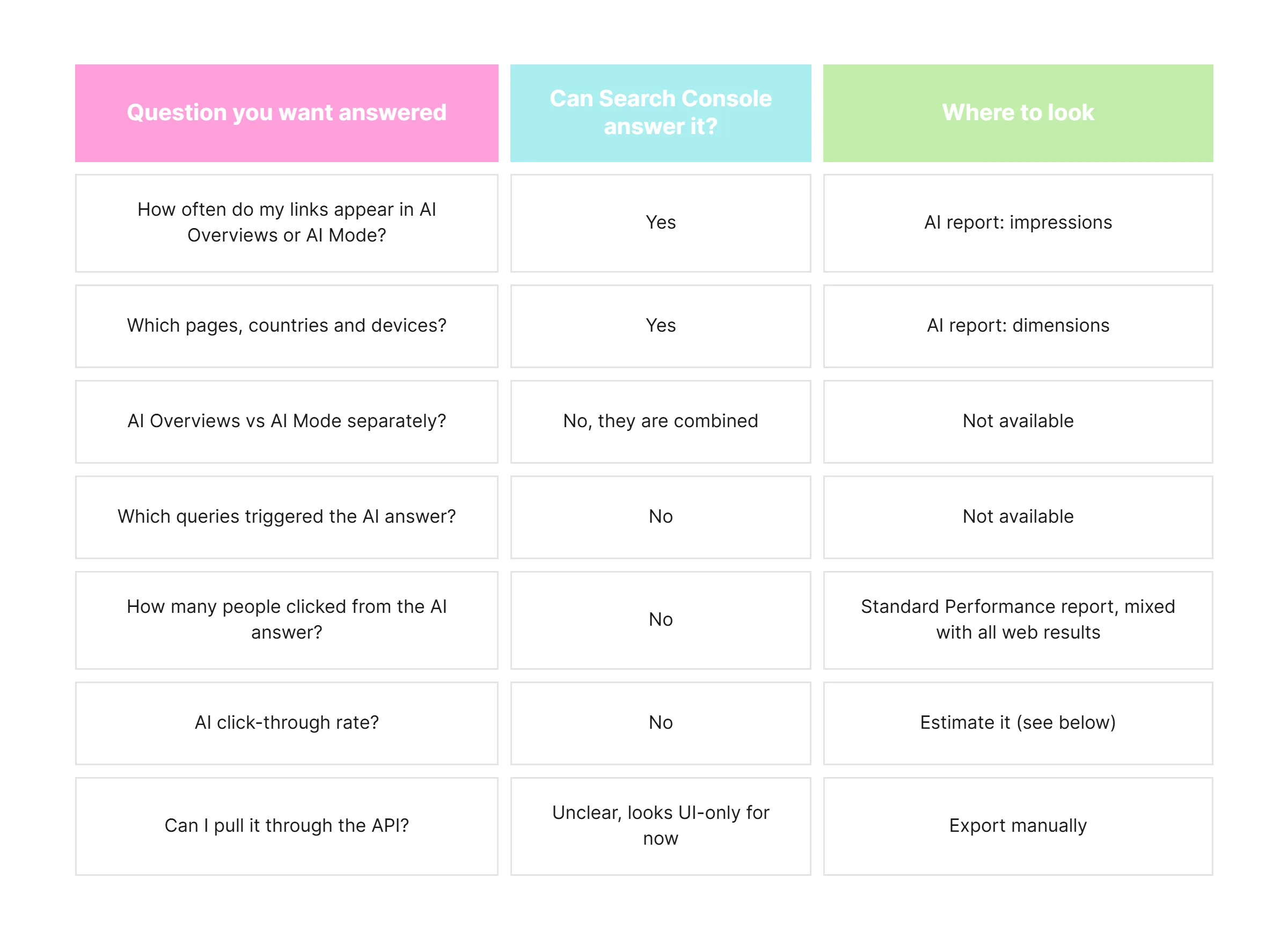 Two counting rules are worth knowing. A click on a link inside an AI Overview or AI Mode counts as one normal click. A follow-up question in AI Mode counts as a brand new query. That second rule can inflate impressions on conversational topics, so don't read a jump as pure growth.
Why the missing clicks matter more than they seem
Impressions without clicks make your reports look healthier than they might be. Here is the pattern a lot of teams are seeing this year: AI impressions climb, total clicks stay flat or slip, and nobody can say whether the AI answer sent the visit or kept it.
Google's own position is that AI features send plenty of traffic. In July, Nick Fox, who runs Google's Knowledge and Information group, said AI features in Search send websites billions of clicks every week. That may be true. But a global number you can't check against your own site doesn't help you plan a content budget.
Independent studies point the other way for many sites. Reported drops in top-result clicks when an AI Overview appears range widely by study and query type; one roundup puts the average at around a third. Your mileage will vary, which is exactly why you need your own numbers.
The date to watch: December 3, 2026
The UK's Competition and Markets Authority set conduct rules for Google on June 3, 2026. They require Google to give publishers impressions, clicks and click-through rate for content used in AI Overviews and AI Mode, plus referral data so publishers can judge traffic quality. Google has until December 3 to comply, with page-level controls due three months later.
Two caveats. The rules cover AI features shown to UK users, and Google can comply in ways other than Search Console. So don't assume a new click column will appear for everyone on December 4. Do assume this is your best shot at real AI click data in the near term, and that you'll want a "before" picture to compare it with.
A 5-step setup you can run this week
You can't get a perfect AI click count yet, but you can get a number you can defend. None of this needs a paid tool.
- Save a weekly baseline from the AI report. Since the data looks UI-only for now, export it by hand every Monday into one sheet: date, page, impressions, country, device. Twelve weeks of history before December 3 gives you something real to compare against.
- Split your pages into two groups. Group A: pages that get AI impressions. Group B: similar pages that don't. In the normal Performance report, track clicks and CTR for both groups each week. If Group A's CTR falls while Group B holds steady, the AI answer is likely absorbing clicks. If both move together, something else is going on.
- Turn on GA4's AI Assistant channel for other chatbots. Google added this default channel on May 13, 2026. It catches visits from tools like ChatGPT, Gemini and Claude when they pass a referrer. It does not include Google's own AI Overviews or AI Mode, which still land as Organic Search. Add a custom channel group for anything it misses, such as Perplexity.
- Treat the text-fragment trick as a hint, not a measure. Some guides suggest a Tag Manager event that fires when a landing URL contains
#:~:text=. Be careful: featured snippets and People Also Ask use the same fragment, and at least one recent test says it no longer works reliably for AI Overviews. Test it on your own site before you put it in a report.
- Ask your visitors. Add an optional "Where did you hear about us?" field to sign-up and demo forms, with "AI search or chatbot" as an option. It's low-tech, but it catches the visits that analytics files under Direct, and those are often your most motivated leads.
If you also get traffic from Bing, its Webmaster Tools has its own AI performance view worth adding to the same sheet.
What to tell your boss or client until then
Report AI visibility and AI traffic as two separate lines, and label the second one as an estimate. Mixing them is how teams end up promising results they can't prove.
A simple monthly slide can carry four numbers:
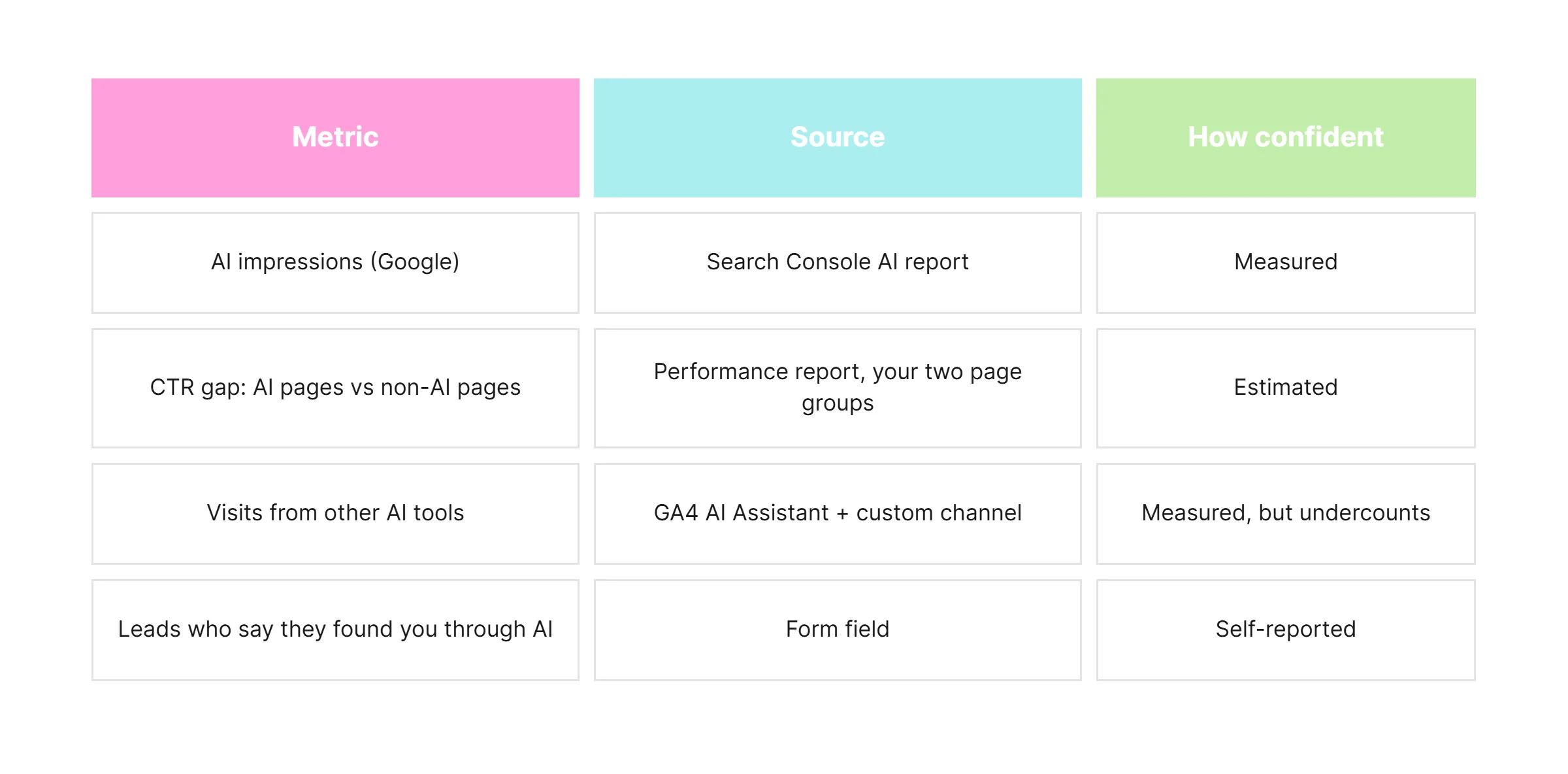 Add one line under the slide naming what's missing: no AI click data from Google, AI Overviews and AI Mode combined, and some AI traffic hidden in Direct. It feels awkward the first time. It saves you a much harder conversation later, when the real numbers show up and don't match the story.
FAQ
Does Search Console show clicks from AI Overviews?
Not separately. Those clicks are counted in the standard Performance report under web search, mixed with regular results. The AI report shows impressions only.
Can I see AI Mode traffic in Google Analytics 4?
Not as its own source. Visits from AI Mode and AI Overviews arrive with a Google referrer, so GA4 files them under Organic Search. The AI Assistant channel added in May 2026 covers other chatbots, not Google's.
Will Google add AI click data to Search Console?
Google hasn't committed to it. Gary Illyes said on November 2 that the team wants to share more data but has nothing to announce. UK rules require AI click metrics from December 3, 2026, but Google may meet them another way.
Why don't I have the AI report in my Search Console?
It's still rolling out. Google started with a small test group in June 2026 and has been adding sites gradually, with no date for full availability.
Should I opt my site out of AI Overviews?
Only if you have evidence it's costing you. Opting out removes you from AI Overviews and AI Mode but, per Google, not from regular Search. Without click data, that decision is a guess, which is one more reason to build your baseline first.
