//
AWS Enlear
Authentication vs Authorization in AWS Amplify
EnlearAuthentication vs Authorization in AWS Amplify
Why Permissions Feel Confusing in Amplify
June 25, 20267 min readRead
Amazon Bedrock Knowledge Bases Explained: How Managed RAG Works on AWS
Building AI for a business is not just about picking a good language model.
In most real-world systems, the harder part is finding the right information from your own documents quickly and reliably. That is why so many teams use retrieval-augmented generation, or RAG.
A RAG system works by combining two parts. One part retrieves useful information from your documents. The other part uses that information to generate a clear answer. This makes the response more accurate, more current, and more useful than a model working on its own.
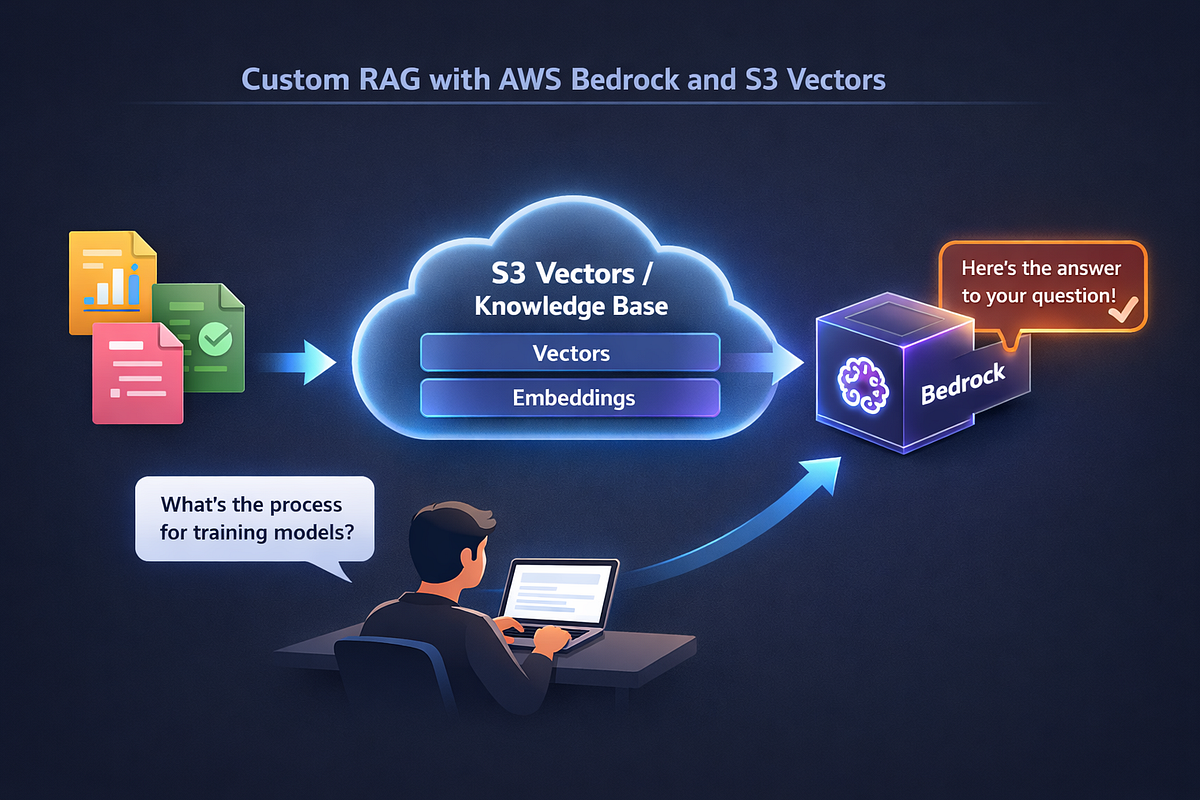
On AWS, Amazon S3 Vectors and Amazon Bedrock give you the building blocks to create this kind of system. Together, they help you store documents, create embeddings, run semantic search, and generate grounded answers.
In this guide, you will see how to build a RAG knowledge base on AWS, where Amazon S3 Vectors fits in, how to prepare documents for better retrieval, and when to choose a managed setup versus a custom pipeline.
To understand Amazon S3 Vectors, you shold first know what are embeddings.
Embeddings are numeric representations of text. They capture meaning, not just exact words. That means two pieces of text can be close together even if they use different wording.
For example, a user might ask, “How can we send data outside the country?” But your source document might say, “Rules for international data transfers.” A keyword search might not connect those two phrases. Semantic search can.
That is where Amazon S3 Vectors helps. It stores the vector representations of your document chunks so your system can search by meaning instead of only by exact terms.
In a typical AWS RAG architecture, Amazon S3 Vectors sits between document processing and answer generation:
So Amazon S3 Vectors is not just storage. It is a key part of the document retrieval layer.
A language model on its own can write well, summarize well, and explain well. But it does not automatically know your internal documents.
That becomes a problem when your users need answers based on things like:
In these cases, the goal is not just to sound smart. The goal is to give the right answer based on trusted source material.
This is why RAG is useful for policy document search and internal knowledge bases. Instead of asking the model to guess, you retrieve the right passages first and let the model answer using that evidence.
That makes RAG a strong fit for:
If your documents change often, or if the content is private, RAG is usually a much better choice than relying on model memory alone.
A practical RAG system on AWS usually has two main flows:
The ingestion flow prepares documents for retrieval. The query flow starts when a user asks a question and ends when the system returns a grounded answer.
A common AWS RAG architecture looks like this:
This is the basic pattern behind many AWS semantic search and document retrieval systems.
Document preparation has a huge impact on retrieval quality.
If your chunks are messy, too large, too small, or missing useful metadata, your answers will suffer even if the model is strong.
Different file types need different handling.
This is why it helps to treat markdown, PDF, and Word files differently instead of pushing them all through the same simple pipeline.
Chunking is the process of breaking a document into smaller pieces for retrieval.
A good chunk should be:
Bad chunking is one of the most common reasons RAG systems perform poorly.
If a chunk is too large, retrieval may pull back too much irrelevant text. If it is too small, the system may lose important context. If there is no overlap, important ideas may get split at the wrong boundary.
Metadata makes retrieval much more useful.
Helpful metadata can include:
Good metadata supports filtering, ranking, attribution, and access control. It also helps the system avoid mixing content from the wrong source.
If you want better RAG relevance, chunking and metadata design deserve a lot of attention.
Once documents are chunked, each chunk needs to be embedded and stored.
A common setup is to use Amazon Bedrock (Titan Model) for embeddings and Amazon S3 Vectors as the vector store. Each chunk is converted into an embedding, then written to the vector index along with metadata.
One important design choice is whether to store only the vector and an ID, or to store useful chunk text in metadata too.
Many teams choose to keep the chunk text directly with the vector metadata because it simplifies retrieval. Instead of retrieving a vector match and then making another request to fetch the text from another database or from S3, the system can return the text right away.
That shorter retrieval path can improve latency and reduce complexity.
This is one of the reasons Amazon S3 Vectors can work well in a production RAG architecture. It supports a simpler path from query to answer when the metadata design is done carefully.
If you are building on AWS, you also need to think about whether to use a managed retrieval option or a custom one.
Amazon Bedrock Knowledge Bases gives you a more managed RAG workflow. It can help with document ingestion, embeddings, retrieval, and answer generation without requiring as much custom logic.
That can be a good choice when:
But a custom pipeline can be better when you need more control over:
So if you are comparing Bedrock Knowledge Bases with a custom Amazon S3 Vectors pipeline, the real question is not which one is universally better. The real question is how much control you need.
Managed workflows are easier to start with. Custom workflows are often stronger when retrieval quality, performance, and control matter more.
A RAG knowledge base is not only useful for chat. It can also help you generate FAQ content from existing documents.
This is especially useful when you have policy documents, internal help pages, or long procedural content that people struggle to search.
Once you have clean chunks, you can use them to create:
For example, if your system retrieves several chunks about employee leave policy, the model can turn that into a simple FAQ answer like:
“What documents are needed for leave approval?”
“How many days of notice are required?”
“Who approves the request?”
This does not replace human review, especially for compliance or legal content. But it can make long documents far easier to use and search.
At query time, the system needs to move quickly and stay focused.
A strong query flow usually looks like this:
A good retrieval pipeline usually does more than just return the top nearest neighbors.
It often also includes:
These steps help improve answer quality. Retrieval is not only about finding similar text. It is about building the best possible context for the model.
A useful RAG system must be trustworthy. That means users should be able to understand where the answer came from and whether they are allowed to see that information.
For enterprise and policy use cases, this usually means your system should support:
If someone asks a question about a policy, it helps if the answer can point back to the source document and section. That makes the system easier to trust and easier to review.
Permissions matter too. A good internal knowledge base should retrieve only content the user is allowed to access. That makes metadata and filtering even more important.
A good AWS RAG architecture also needs to be practical to run. Cost and operations matter just as much as answer quality.
Some of the main things to plan for are:
A simple retrieval path can reduce runtime cost and latency, but it may create more work during document maintenance.
For example, if your pipeline stores chunk text directly with vector metadata, retrieval may be faster. But re-ingestion, updates, and cleanup may need more careful lifecycle handling.
That is why a production-ready system needs more than a working demo. It needs a plan for long-term maintenance.
There is no single right answer for every team.
A managed Bedrock workflow may be best when you want:
A custom pipeline with Amazon S3 Vectors may be best when you want:
In short:
Choose managed when speed and simplicity matter most.
Choose custom when control and optimization matter most.
The hardest part of building a strong RAG system on AWS is not just choosing a model.
It is designing the full path from raw documents to grounded answers.
That includes:
Amazon S3 Vectors is most useful when it is treated as one part of that bigger system.
If your goal is to build a searchable internal knowledge base, a policy document search system, or semantic search for business documentation, the best approach is usually the same:
start with the user problem, prepare documents carefully, keep retrieval clean and fast, and only generate answers after the right evidence has been retrieved.
That is how you turn a collection of documents into a useful RAG knowledge base on AWS.
A version of this article was first published on April 2, 2026 on Medium.
EnlearWhy Permissions Feel Confusing in Amplify
EnlearAWS DynamoDB Eventual Consistency VS Strong Consistency Amazon DynamoDB reads data from tables, local secondary indexes (LSIs), global secondary indexes (GSIs), and streams. Both tables and LSIs …
EnlearWhat Is Amazon EC2? A Beginner’s Guide to Virtual Servers in AWS Amazon EC2 (Elastic Compute Cloud) is a service that provides virtual servers, called instances, in the cloud. You can choose the …